
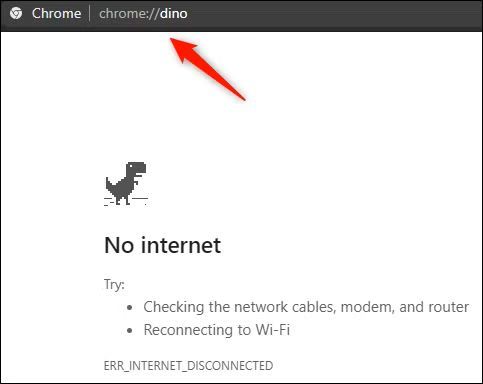
To turn on Dinosaur Game, open Chrome and go to chrome://dino, then press Space to start, or simply go offline and press Space on the “No internet” dinosaur screen.
On desktop, open Chrome, type chrome://dino, press Enter, then press Space to start (Space jumps and Down Arrow ducks).
On mobile, open Chrome, load chrome://dino, then tap the screen to start and jump.
If you are offline, open any page to trigger the “No internet” dinosaur screen, then press Space on desktop or tap on mobile to begin.
A quick five minute break on ABCya3 can reset your focus so you return to Dinosaur Game with steadier timing and fewer panic jumps at the spot where you kept crashing.
Read the full guide below to learn How to turn on Dinosaur Game and start the Chrome T Rex run anytime in seconds.
To turn on Dinosaur Game, open Google Chrome, type chrome://dino in the address bar, press Enter, then press Space to start (or tap the screen on mobile).
If that page does not load, you can also trigger the Chrome T Rex game by opening any webpage while offline, then pressing Space on the “No internet” screen where the dinosaur appears.
Dinosaur Game is an endless runner designed for fast, no-setup play, which is why it feels perfect for short breaks on a laptop, Chromebook, or phone. It looks simple, but it becomes addictive because the speed ramps up and small timing errors get punished, so each run naturally turns into a goal: jump a little later, land a little cleaner, and push your personal best higher without panicking.
If you are on a laptop or PC, this is the fastest method.
Controls are straightforward.
On mobile, it is the same idea with touch controls.
When birds appear, a longer press or a quick down action may duck depending on your device and build, but the core rule stays the same: keep inputs calm and timed, not spammed.
If your internet drops, Chrome often shows the dinosaur automatically on the offline page. When you see it, you can start immediately.
This is why many players first discover the game during a connection problem, then later learn they can launch it anytime.
If chrome://dino does not load or the game will not start, you are likely on a managed device where settings are restricted. Some school Chromebooks and workplace setups limit internal Chrome pages or block certain built in features.
In those cases, you can still look for a browser playable version, but keep expectations realistic.
Hosted versions can behave differently from the original and may not feel as responsive.
ABCya3 and a quick reset that improves your timing.
If you keep crashing at the same point in Dinosaur Game, you may be tilted instead of truly stuck, and that tilt usually shows up as early jumps, late reactions, or inconsistent spacing on the same obstacle pattern.
A quick five minute session on ABCya3 is a simple reset because it changes the pace and clears the “panic rhythm” you build when you retry the same section too many times.
Pick one short, low-pressure game, play calmly, then stop on purpose instead of chasing a score.
When you return to Dinosaur Game, your hands tend to feel steadier, your eyes read obstacles earlier, and your jump timing becomes cleaner, which is often enough to push past the point that kept ending your runs.
Yes. You can launch it anytime in Chrome by using chrome://dino.
Open the Dino page and press Space on desktop or tap on mobile.
You may be using a browser that is not Chrome, or your device may be managed with restrictions.
Jump with Space or a tap, duck with the Down arrow when birds appear.
Now you know exactly How to turn on Dinosaur Game in seconds, whether you are online, offline, on desktop, or on mobile.
If your timing starts getting messy, take a short break on ABCya3, then come back and push for a smoother run and a higher score.